Website migration may be a requirement when it comes to expansion, platform updates, redesigning, CMS updates, and e-commerce expansion. Though these updates can improve performance and scalability, they pose a serious risk to search engine optimization. Meta titles, descriptions, and URLs are core elements in search engine ranking and search engine visibility. A wrong approach towards migration can lead to a loss of search ranking positions, click-through rate, and traffic. For any web development firm handling a migration, these elements have to be preserved. Metadata and URL information have SEO history, which has been achieved through indexing, interaction, and backlinks. Preserving such elements ensures search engines can crawl and index your sites properly when handling a migration. Conduct a Meta Title, Description, and URL Audit for Migration A successful migration begins with an audit of the existing site. Such an analysis determines a current SEO level, establishing which assets need to be preserved during migration. Importance of Conducting a Pre-Migration SEO Audit Meta titles and descriptions affect search result listings, and URLs serve as permanent pointers for content in search indexes. Often, existing well-ranked content in organic search drives a huge portion of total search traffic and revenue. A change in or loss of these parameters can make search engines view content pages as new or obsolete. An audit can assist in identifying: What to Include in an Audit As part of this audit, each indexable URL, its corresponding meta title, meta description, canonical URL tag, and indexing status will need to be recorded. URL formats will have to be checked for blog articles, service pages, and e-commerce product listings. It will serve as a basis for maintaining meta tags during migration. Methods of Preserving Metadata During Migration Metadata Loss Metadata loss is another prevalent SEO problem associated with migration. Most sites overwrite or have their metadata automatically generated if it is not managed properly. Preserving Meta Titles & Meta Descriptions The Meta Title and Description information must be exported before carrying out a migration. Then, they can be directly associated with the relevant elements within a new CMS platform. Usually, when an individual initiates a migration, they will not be able to associate elements properly, leading to an empty, duplicated, or truncated Meta Title and Description. Such an issue can be especially critical in e-commerce SEO migration because product page SEO titles are very important for e-commerce SEO. Ensuring the preservation of original metadata enables: Every CMS platform functions uniquely when it comes to handling metadata. A piece of metadata in one CMS platform will not necessarily work in another platform without modifications being made. Staging environments can be used to check if title and description imports work properly before a launch. A systematic workflow with a seasoned web development agency at the helm will make sure metadata preservation is considered in web development and not an afterthought. Handling URL Updates: Preserving SEO Gain URL changes can sometimes prove unavoidable in a migration, particularly in restructuring content or optimizing a site structure. However, unnecessary URL modifications pose SEO risk and should be avoided. When URL Changes Are Necessary URL updates may be necessary due to platform limitations, better categorization of URL updates, and cleaner e-commerce URL structures. Here, it is essential to keep in mind the importance of maintaining relevance. Best Practices for Preserving URLs Wherever possible, it’s always best if existing URLs are left unchanged. Fixed URLs enable search engines to maintain their index and link equity. Where changes become necessary, URLs should be preserved in: Application of Redirect Mapping Changing URLs makes it necessary to have URL redirection for better results. Every old URL will need to redirect to its most relevant new URL through a permanent redirect. Some common #SEO blunders include using redirect chains, opting to redirect multiple pages to a single page, or using such links to direct people to content that is not relevant. Post Migration Validation for Search Indexing & Performance Once the migration is launched, validation, SEO preservation are achieved successfully. Verifying Metadata Critical Pages need to be evaluated to check if the meta titles & descriptions are consistent with the pre-migration audit. The presence of duplicate and missing metadata can easily mislead search engines and weaken relevance signals. The canonical tags must be checked to avoid index conflicts. Monitoring URL Indexation The updated XML sitemap copies need to be submitted to the search engines, and crawl error notifications or soft 404 errors/no index tags indicate problematic migrations, which need to be fixed immediately. Measuring SEO Stability Comparing traffic trends, search ranking positions, and crawl data to pre-migration levels is essential. Small deviations are to be expected, but a gradual fall in rankings can indicate a problem with metadata or URLs. Conclusion Meta Titles, Description Tags, and URLs are a long-term SEO investment. Losing access to them can remove years of search engine optimization in a very short period. A more systematic way of handling existing assets, meta tag retention, URL preservation, and optimization checks after launch is required. When it comes to businesses that are in the process of ecommerce SEO migration or platform upgrades, partnering with an expert ecommerce website development company ensures continuity in SEO. With a proper strategy in place, migration can become a positive experience rather than a risk factor for search engine rankings. Contact us for a smooth migration!
Blog
How 301 Redirects Protect SEO Rankings During Migration
Website migration is a necessity when businesses change their approach to developing and designing their websites. Although these improvements make their performance better, they pose serious threats to SEO. Among other dangers, the most common factor leading to a loss in ranking and traffic is the way in which old URLs are dealt with. SEO migration targets more than relocating files and rearranging layouts. SEO migration aims at maintaining search engine visibility, passing on link equity, and ensuring that all crawled pages remain intact. Search engines can find it rather confusing when content migrates without a plan for directing them using 301 links, resulting in issues with crawl errors, links, and organic search traffic. Comprehending 301 Redirects and Their Application in SEO Migration Processes A 301 redirect is a permanent instruction to search engines and browsers to inform them of a web page relocation to a new URL. A 301 redirect will relay most of an old page’s ranking signals to a new page when properly set up. Therefore, a 301 redirect will transfer a page’s equity to a new page. During SEO migration, search engines use 301 redirects in order to update their indexes. A crawled page with a 301 redirect will instruct the search engine crawler that the old URL can be replaced with a new URL in search engine indexes. Temporarily redirected URLs, such as 302 redirects, function differently. They show that a page might come back, which can hinder correct index refreshes. In the matter of developing and designing sites when permanent modifications need to be put in place, 301 redirection is the preferred option. Pre-Migration Planning: Finding URLs Requiring Redirects Effective SEO migration starts with an assessment of existing URLs. A thorough assessment of all indexable pages with search volume, links, and keywords is a necessity before embarking on SEO migration. Some of the major URL categories where redirect planning is important include: Giving less priority to low-traffic pages can sometimes cause crawl problems if search engines find broken paths. Taking a complete URL inventory will ensure that no important page gets overlooked during a website update. Redirection mapping must be more relevant. The old URLs should redirect to the most relevant new URL, rather than automatically being redirected to the new homepage. In this way, SEO migration information will not be affected. Handling 301 Redirects in Website Migration Secondly, after the process of redirect mapping is accomplished, implementation emerges as another important step. Meanwhile, redirects can be achieved at either a hosting level, a content management level, or a server level, depending on which platform one is using. Some of the implementation guidelines include: When implementing developments and design changes on websites, HTTPS enforcement, mobile format modifications, and URL rewriting rules should be incorporated under the same umbrella for redirects. Combining these rules will improve accuracy and crawl performance. Pre-testing rules for redirects can ensure these rules do not cause conflicts before a launch. Post-Migration Validation and Ongoing Monitoring Migration is not complete with the launch of redirects. Search engine evaluation post-launch migration is critical to ensure search engines are processing intended modifications successfully. Some of the major validation steps are: “Missed” redirects can show up as “404 not found” errors in crawl reports. Such issues must be fixed right away in order to avoid search engines failing to index important URLs. Handling missed redirects must not be a one-time consideration but rather a continuing process when designing a site. Redirects may have to be updated in order to keep up with content updates. Seamlessly ensuring SEO migration work remains relevant in maintaining search engine presence after an SEO launch is achieved through continuous monitoring. Common Mistakes in Redirect Mapping A variety of challenges are common in making SEO migrations successful: Every one of these errors lessens search engine signals and dilutes the effectiveness of 301 permanent redirects. A good strategy with proper execution will allow you to not lose search engine rankings when you migrate your content. Conclusion Redirect mapping can be a sound backup strategy for search engine optimization. Long 301 redirections are the basis of SEO migration. They are an SEO migration tool being used to give search engines a directive during the designing stage of a website concerning ranking and other organic views. URLs need very careful planning and precise execution. SEO-safe migrations are not random occurrences. They are a product of well-structured operations where accuracy in redirecting and sustained focus on ongoing maintenance are aspects of high significance. Through careful investment in accurate 301 redirect management, SEO migration sustainability can be achieved.
How to Migrate Payment Details & Shipment IDs Safely
Table of Contents Migrating an e-commerce store involves far more than moving product data or design assets. One of the most sensitive parts of any transition is the movement of payment information and shipment IDs. These two data types are tied directly to checkout workflows, fulfillment accuracy, and customer trust. If they are not handled correctly, you risk failed transactions, broken checkout pages, missing shipment histories, and customer service issues that can quickly escalate. This means that for e-commerce businesses outsourcing website development services, the objective is straightforward: payment information and shipment data should be moved without a feeling of discontinuity. Well-planned migration means that customers would keep on placing their orders uninterruptedly and that shipments in process would remain trackable without any gap. Understanding Your Present Payment Gateways and Shipping Systems A successful migration begins by first understanding how your payment processors and shipping tools currently organize data. Different gateways, such as Stripe, PayPal, and Authorize.Net, along with various regional banking integrations, each structure data a little differently. One system may hold payment tokens; another may retain transaction and authorization records; others maintain refund or dispute logs related to individual orders. Your shipping system also plays an important role. This includes the carriers you use, tracking formats, shipping apps, warehouse tools, and fulfillment systems. Data in shipments usually contains: A structured evaluation at this stage allows your website development services provider to map accurate migration steps and identify potential risk points. Mapping Customer Orders, Payment Identification Numbers, and Shipment Tracking Order information is an interconnected network of payment information, fulfillment activities, and customer data. For e-commerce migration to be safe, each component needs to remain connected post-transition. Begin by listing the following information fields related to the order: All these elements should be mapped to their corresponding fields in the new platform. Not all e-commerce systems store data in the same structure. In the case of a new system where older orders are checked, accurate mapping ensures the continued perfection in payment references and shipment details. This avoids any customer confusion and also helps internal teams to continue support operations without interruptions. Migration of Payment & Shipment Data: A Step-by-Step Process Prepare Your Migration Environment Export all necessary payment logs securely before you transfer anything, along with customer tokens and historical order data. If your gateway supports exporting tokens or migrating vaults, request these files directly from the provider. Many gateways require approval or a specialized process to ensure compliance before releasing tokenized data. For shipment migration, export all tracking data for the orders that are still in transit or need future fulfillment action, usually comprising open orders, recent shipments, and partially fulfilled orders. Up-front preparation of these exports prevents delays once the actual migration process is underway. Migrate Payment Information Securely Payment information is highly sensitive. Because of PCI-DSS requirements, most modern e-commerce systems refrain from storing raw payment details; tokenization is most common these days, where a customer’s method of payment is stored in a secure token within the gateway’s vault. During migration: Once the migration starts, make sure that: Shipment IDs & Tracking Data Migration The shipment data is just as relevant, particularly in case orders are in processing. This includes the following: Depending on your setup, some shipment data may need to be restructured. For instance, platforms handle multi-item shipments or partial fulfillments differently. Ensuring correct data formatting before import helps avoid errors after the migration. Synchronizing Live Orders During Migration While the migration occurs, new orders may still come in. Customers may place new payments, shipment labels may be generated, and tracking IDs may be updated. To avoid losing this information: This prevents mismatched statuses, missing shipment updates, or payment discrepancies for orders processed during the transition period. Post-Migration Testing and Validation After the data is transferred, testing becomes the most crucial phase. Even a perfect migration can still encounter hidden issues. Concentrate on confirming: Testing should cover edge cases, including subscription renewals, multi-item shipments, or orders from multiple geographic regions. Website development services often run automated and manual tests to catch issues before the new platform goes live. Conclusion A strategic migration of payment information and shipment IDs prevents checkout errors, fulfillment delays, and data loss. With a systematic approach, facilitated by professional website development services, your e-commerce store will make the transition safely without compromising customer confidence. Contact us.
Step Guide to Moving Product Variations & Images Correctly

Table of Contents When migrating to a different e-commerce platform, this is not just about product data. Variations and images require special attention since these drive the way customers explore and select products. When migrating to a new e-commerce platform, this is not all about product data. Variations and images are in need of special attention since these drive how customers explore and choose products. When migration is not appropriately handled, stores are left with missing images, broken variant relationships, mismatched SKUs, or layout issues. A structured approach, rooted in accurate data handling and clean web development design, is what will keep this new store stable and functional. Why correct variant & image migration matters Product variants are intrinsically related to main catalog functionalities such as size selection, color or material option choices, inventory tracking, and pricing. When those relations break, customers usually experience failed-consistency product pages, disabled filters, or options that cannot be selected. This has a direct impact on conversion. Images also play a central role, especially because each variation does require its own visual asset. There’s uncertainty for shoppers with a color variant without the correct image. Incorrect media mapping from a technical viewpoint leads to broken links, layout shifts, or inconsistent performance. Migration errors also affect SEO because image filenames, alt attributes, and structured data contribute to visibility in search engines. Ensuring accuracy protects the entire storefront’s visual flow and usability. Preparing Your Product Catalog for Migration Mapping Product Variations Correctly Transferring Images & Media Assets Safely Post-Migration Validation Checklist Common Issues & How to Avoid Them Many issues arise simply because of mismatched filenames, inconsistent attribute labels, or missing variant relationships. Duplicated SKUs cause conflict upon import, while incorrect folder paths break media. This could be easily avoided by performing a clean mapping sheet, a stable image structure, and proper testing after migration. Now is the time to fix such issues rather than later when the site is live. Conclusion Auditing data, mapping variants, preparing media, and validating results in clear succession ensures that product variations and images are accurately moved. This approach minimizes errors, sustains catalog quality, and keeps the store ready for customers. For teams involved in complex migration projects, implementing these steps will not only provide reliable, disruption-free catalog transfer but also long-term store stability. Contact us.
Web Development Services for Agencies: BitcraftX Remote Support
Table of Contents Digital agencies work in markets with clients expecting continuous delivery, predictable outcomes, and effective project management. Most of the agencies today employ remote teams to manage workload, develop capabilities, and cut operational costs. BitcraftX partners with such models by providing remote technical services to keep a thriving digital agency stable in its output and handle more projects. This blog tells you how a Thrive Digital agency works, why remote expertise is so crucial, and how BitcraftX helps such agencies with structured processes and measurable outcomes. What Defines a Thrive Digital Agency A Thrive digital agency keeps a steady performance, stable client acquisition, and reliable service delivery. It works with data, uses organized systems, and builds repeatable processes across development, SEO, design, and digital strategy tasks. These agencies rely on project management tools, analytics platforms, and automation systems to maintain workflow accuracy. The typical agency works in several areas of service, including website development, SEO, UI/UX design, conversion rate optimization, and eCommerce development. For each one of them, the agency keeps separate teams or remote partners. A Thrive digital agency focuses on operational consistency, maintaining steady timelines, meeting client expectations, and managing long-term retainers. For this to happen, the agency needs access to a wide skill set-which is the reason why many agencies adopt a remote workforce strategy. Reports on remote work adoption indicate a linear growth in outsourcing technical and creative talent. The trend is used by digital agencies to source skills that are probably not available in the local market. This approach supports workload expansion without increasing internal hiring. Why Remote Expertise Has Become Essential Remote expertise enables digital agencies to continue being flexible. The rise of remote work has accelerated global hiring, allowing businesses to onboard specialized developers, creatives, and SEO talent from anywhere. Agencies benefit by accessing expertise across a variety of digital tools and platforms. Remote resources reduce cost pressure. Agencies scale output without adding full-time salaries, office space, or local hiring expenses. Agencies also benefit from time-zone coverage that allows tasks to move forward outside local business hours. This reduces delays during busy months or during multiple project launches. Another advantage is scalability. Agencies often take on large projects that require temporary skill expansion. Remote teams allow agencies to increase capacity for either short-term or long-term workloads without adjusting internal structure. BitcraftX as a Remote Digital Partner Bitcraftx is a remote support company for agencies that need technical, design, and SEO support. They support marketing agencies, creative firms, eCommerce-focused teams, and SaaS providers that have requirements for stable technical output. BitcraftX manages tasks with documentation-driven processes and structured workflows. The team works in collaboration platforms, version control systems, and shared communication channels for transparent execution. Transparency also extends to agencies working with Bitcraftx through regular reporting, predictable delivery cycles, and clear task breakdowns. The remote support model is built for agencies that want to grow without having to hire more people in-house. Bitcraftx connects agencies with technical resources for increasingly complex or higher volume tasks. Core Services Bitcraftx Provides to a Thrive Digital Agency How BitcraftX Helps Thrive Digital Agencies Achieve Business Success Remotely BitcraftX provides remote support to agencies, which can enable them to maintain consistent output without expanding their internal teams. Agencies can deliver websites, e-commerce builds, SEO tasks, and design projects at a consistent rate. This reduces downtime and underpins predictable timelines for clients. The remote model helps agencies to manage larger workloads. BitcraftX fills technical skill gaps with developers, designers, and SEO specialists who are available for both ongoing and project-based needs. In turn, this helps agencies avoid long hiring cycles and enables them to deliver faster project completion. Agencies benefit from stable delivery across multiple client accounts. Bitcraftx’s structured workflow reduces errors, improves communication, and helps agencies maintain quality control. How Remote Projects Are Managed in Collaboration BitcraftX uses a clear project process. The workflow starts with the gathering of requirements and a basic scope breakdown. All tasks are documented before development, and progress is tracked with leading tools. Version control is done smoothly through GitHub or Bitbucket so that agencies can easily inspect and approve code changes. Weekly reports cover tasks completed, active tickets, and next steps. Communication cycles are on a set pattern. Agencies have updates at regular intervals, while team availability is maintained at mutually agreed time slots. This ensures that information flows constantly and misalignments are minimal. Advantages for Digital Agencies Partnering with BitcraftX Conclusion A Thrive digital agency needs predictable output, organized workflows, and access to technical skills. BitcraftX supports this model by offering remote development, SEO, design, and eCommerce services. Agencies seeking stable execution and support that scales can partner with BitcraftX to strengthen operations and maintain steady project delivery. Scale Your Agency Remotely → Contact US
Multi-Store Migration: Keep Inventory & Customer Data Consistent
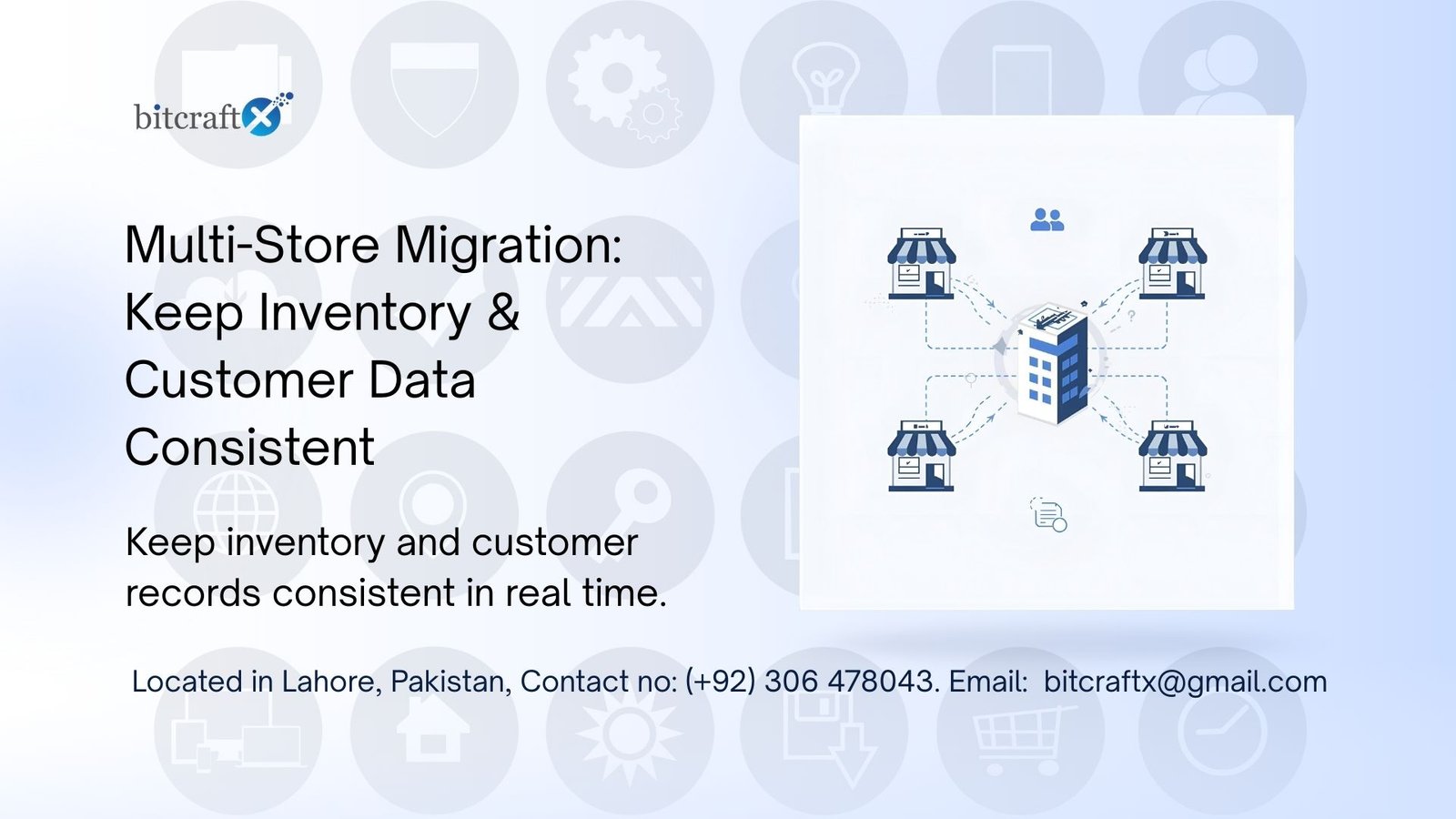
Migration is a major operational shift for brands operating multiple e-commerce stores. Years of independent growth can lead to inconsistent catalogs, integrations, and workflows. During migration, the real complexity is maintaining clean inventory and customer data while the business remains active and orders continue to flow. This is why multi-store migration requires a unified data strategy, supported by a reliable e-commerce sync to maintain real-time accuracy. Common Multi-store Complexities Because all stores are usually still active while the migration happens, the operational complexity is multiplied. Inventory changes every minute. Customers continue placing orders. Payments keep flowing. There is no natural “pause” button. This is where e-commerce sync becomes essential to maintaining accuracy from start to finish. Why Inventory Consistency Must Be Protected During Migration Inventory accuracy determines whether businesses ship on time, prevent overselling, and maintain customer trust. During multi-store migration, inventory can become inconsistent quickly if the data flow is not controlled. Several of these triggers cause this to happen, such as: Inventory is a changing asset. Poor inventory sync during migration leads to stock mismatches, which may require manual corrections, delays in orders, and a deteriorated customer experience throughout every touchpoint. Customer Data Consistency is Equally Important Businesses often do not realize how complex customers are until they try migrating information across multiple stores. However, it is within customer data that most inconsistencies are found. A brand might discover the same person was listed three times in three stores, with marginally different spellings of their name, outdated addresses, and variations in email formats. Customer inconsistencies impact: E-commerce sync ensures that the merging, normalizing, and maintenance of customer records during a multi-store migration do not disrupt ongoing customer activity. Unified Data Model: The Role It Plays A key precursor to successful multi-store migration is the definition of a unified data model by the business before any technical steps begin. One unified model will govern how products are structured, how SKUs are standardized, how variations are represented, how customer fields are organized, and how categories map across stores. This model becomes the reference point of the new system. It determines: It makes a set of siloed stores into one coherent ecosystem. On migration, it removes all the noise caused by legacy systems and ensures that the new platform is initiated with cleaned-up and integrated data. E-commerce Sync in Multi-Store Migration: Why It Matters E-commerce sync keeps everything in real time during the whole migration process. Stores seldom go into cold storage. Along with streaming orders, updating profiles, and changing inventory, the synchronization bridges between the old and new systems. Without this step, organizations often face post-migration challenges that require weeks to resolve. Building a Modern Migration Strategy Modern e-commerce operations depend on accurate real-time data. Multi-store migrations must follow that same standard. Migrating multiple stores without a sync-first approach forces the business to rely on outdated exports and manual reconciliations, something that does not scale and introduces risk. A better approach is to consider migration as a type of data transformation rather than a file transfer. Such an approach will guarantee: All shops migrate with ease to the new platform. This approach reduces the after-migration operational burden on warehouse teams, customer support, and marketing teams. Instead of spending weeks correcting data, the business can focus on growth, performance, and platform capabilities of the site. Conclusion Migrating multiple stores is no small task, but with the proper data strategy, it becomes an opportunity to advance accuracy, consolidate systems, and elevate customer experience. The two main pillars that define whether multi-store migration will strengthen operations or truly disturb them are inventory consistency and customer integrity. In unifying data, maintaining real-time ecommerce sync, and transitioning to a structured model, businesses can migrate multiple stores with confidence, maintain continuity across every channel, and start operating on more solid, scalable ground. Book a Demo
WordPress Developers in Pakistan: BitcraftX for Remote & Offshore Services

Introduction WordPress is still among the most prevalent content management platforms across the world. Business uses WordPress to build websites, online stores, and digital operations as it is a flexible and universally supported application. With the expansion of the organization, the issues associated with updates, security, performance, and the creation of unique features are likely to emerge. Offshore teams are becoming the choice of many companies offering formal workflow and reliability in delivery, but not at the expense of full-time in-house teams or Western agencies. BitcraftX offers remote and offshore WordPress development from Pakistan. This article looks into why Pakistan has emerged as a reliable outsourcing hub and how BitcraftX fulfills global needs. Why Businesses Look for WordPress Developers in Pakistan Pakistan’s IT outsourcing industry has grown. Industry reports highlight the country’s IT market size to be about US $3.5 billion, with further growth forecasts. This growth is due to several factors that shape outsourcing decision-making processes. All these factors combined create a practical environment in which to outsource WordPress development work. BitcraftX: A WordPress Development Provider from Pakistan BitcraftX provides WordPress development services remotely and offshore for international clients. The company focuses on structured workflows, technical skills, and scalable engagement models. Clients work with BitcraftX to have access to: BitcraftX is an external unit working on both short and long-term projects, offering flexible team capacities and stable development cycles for those companies in need of continuous support. Remote & Offshore WordPress Development Services Offered A service provider like BitcraftX typically covers the full range of WordPress development. Such services support businesses that want to launch new websites, expand existing platforms, or maintain operational sites. These services support both ongoing operations and new builds for clients across industries. Why Choose BitcraftX over Other WordPress Providers in Pakistan? Several factors dictate why global clients work with BitcraftX: These attributes let international clients work with Bitcraftx as an extension of their internal team. BitcraftX Hiring Models for International Clients BitcraftX offers multiple hiring frameworks: These models help companies match their resource needs without long-term hiring commitments. What Clients Gain When Working with Bitcraftx This includes: These outcomes result from combining offshore cost advantages with coordinated workflows. Conclusion WordPress remains central in modern web development around the world, and outsourcing to Pakistan is a practical way of accessing skilled talent at controlled costs. Bitcraftx offers structured remote and offshore WordPress services covering new builds, upgrades, and ongoing maintenance needs. To get started with your dedicated WordPress team, reach out to BitcraftX with your project requirements.
Web Development Company in Pakistan for Offshore Success

Introduction Hiring a trusted web development company has become a strategic move for global businesses. With rising costs, tighter timelines, and increasing digital pressures, companies are now outsourcing development more than ever. Pakistan has quickly become one of the top outsourcing destinations—affordable, skilled, and fluent in global workflows. This article breaks down why choosing a web development company in Pakistan, especially BitcraftX, is not just cost-effective but a genuinely smart business decision. Section 1: Why Offshore Web Development Is Increasing The offshore movement is no longer experimental. Companies outsource development to: Remote collaboration tools matured rapidly during the pandemic, making distributed teams the new normal. Businesses that once hesitated now depend on offshore partners to stay competitive. BitcraftX, operating from Lahore, is part of this global shift—delivering fast, reliable, and high-quality solutions for clients across the US, UK, UAE, and Europe. Section 2: Why Pakistan Is Becoming a Web Development Hub Section 3: What Makes a Great Web Development Company? A strong web development company delivers: BitcraftX checks all these boxes—with a portfolio that proves it. Section 4: BitcraftX, A Trusted Web Development Partner Founded in 2019, BitcraftX focuses on building clean, scalable, business-aligned digital products. Core Services BitcraftX operates fully remote, runs agile sprints, and uses modern project management standards. Section 5: Case Studies Shopify + CRM Integration A startup required Shopify–HubSpot integration. BitcraftX built custom backend logic, reducing manual workload by 60% and boosting deal closures by 30% in the quarter. Laravel CRM for UK Agency A marketing firm needed a custom CRM. BitcraftX delivered an MVP in four weeks and automated campaign triggers, saving over 10 hours weekly. Section 6: Benefits of Working with BitcraftX Partnering with BitcraftX means gaining a dedicated product team, not just developers. Section 7: Real-World Business Impact BitcraftX consistently delivers measurable outcomes: Section 8: Who Should Partner with BitcraftX? Section 9: Getting Started The process is simple: Conclusion Hiring a web development company from Pakistan is now a strategic advantage—not a gamble. BitcraftX pairs cost efficiency with global-grade technical execution, delivering scalable platforms and long-term value. If you’re ready to build intelligently, it’s time to talk to BitcraftX. → Book your consultation: https://bitcraftx.com/
BitcraftX Custom Web Development Services for Global Companies

Section 1: Why Custom Web Development Is in High Demand Customization for unique workflows and systems Custom web development is no longer an afterthought necessity, it is a necessity for businesses that want to remain competitive. In an internet age where user experience, speed, and clean integration determine success, custom websites provide something pre-fabricated templates simply cannot: versatility, security, and control per brand. International businesses increasingly outsourcing to Pakistan for cost-effective, high-quality development. Today’s business environment is heterogeneous. No two businesses have the same workflows, customer experiences, or in-house systems. Templated sites might be fast to set up, but they don’t usually cater to the richness and flexibility that changing businesses need. That’s why customized solutions are gaining traction, particularly for international organizations aiming to match their digital platforms with certain business goals. Introduction to BitcraftX’s expertise Businesses are discovering high-quality service without compromising on quality. BitcraftX, a Lahore-based company, has become one of the names to watch in this arena, providing custom web development services to global businesses. Section 2: What Are Custom Web Development Services? Definition and differentiation from templated solutions Custom web development is the process of creating websites or web applications from the ground up, designed specifically to a client’s objectives, design vocabulary, and functional needs. In contrast to off-the-shelf templates or pre-existing platforms, custom development starts with discovering a business’s precise needs with a fully operational product that embodies those needs. Key elements: Real-world examples: retail inventory systems, automated coaching platforms. A retail firm might require a customized inventory management system integrated into its website. A coaching firm might require automated scheduling tools linked with CRM software. These are not merely design-level adjustments; these entail full-stack development. Section 3: Why Companies Require Custom Web Development? Section 4: Elements of a Successful Custom Web Development Project Section 5: Technologies Used Custom development requires a well-matched tech stack. BitcraftX utilizes both frontend and backend frameworks to develop efficient, scalable applications. For user interfaces, they make use of React, Vue.js, and Tailwind CSS. On the backend, they use PHP, Laravel, Node.js, and Python, based on the purpose. Databases like MySQL, MongoDB, and PostgreSQL facilitate handling data securely. CMS platforms like WordPress and Shopify are frequently customized with distinctive themes, plugins, or storefront capabilities. DevOps tools like Docker, Git, and AWS enable effortless deployment and CI/CD pipelines. On integrations, BitcraftX has integrated platforms with tools such as Stripe for payment, Zapier for workflow and automation, and HubSpot for lead generation. All projects incorporate SEO best practices and include SSL, security practices, and loading architecture to serve contemporary performance. Section 6: Choosing the Right Partner Section 7: BitcraftX: Pakistan’s Premier Provider Founded 2019, Lahore-based. Since 2019, BitcraftX has helped startups, agencies, and enterprises across the US, UK, Canada, and the Middle East build secure, scalable digital products. With a core team of professionals, they bring full-stack capability and a results-driven mindset to every project, helping clients launch smarter, grow faster, and operate more efficiently. Core Services: Why BitcraftX Stands Out Among Web Development Agencies Section 8: Featured Projects Section 9: Development Process It starts with a consultation where the team knows your goals and target audience. Then, UI/UX design comes through wireframes and mockups. Features are developed in agile sprints during development. Testing and QA guarantee performance, speed, and security. Deployment comes after that, getting your app or site live on production servers. After launch, BitcraftX offers bug fixes, optimization, and long-term partnership for feature updates and growth. Section 10: Cost Considerations A basic CMS website is cheaper than a SaaS solution with user dashboards, automation, and third-party integrations. BitcraftX provides three pricing models: In terms of ROI, investing in custom development translates to improved performance, fewer maintenance issues, and scalability, which is cost-effective in the long run. Conclusion Custom web development is not a fad, it’s a competitive edge. International companies looking for strong, adaptable, and efficient digital platforms, BitcraftX provides the perfect combination of technical expertise, process clarity, and business acumen. Partnering with BitcraftX means collaborating with a company that gets your business, not merely your technology requirements. Ready to bring your business concept to life as a fast, secure, and scalable digital solution? Contact us! https://bitcraftx.com/contact-us/ FAQs:
How to create a webhook URL for a Slack Channel?
In today’s digital age, deriving the maximum advantage from collaborative tools like Slack involves delving beyond the basics. A key aspect of this is using Webhooks, which allow third-party extensions to send live updates. In this beginner-friendly tutorial, we will explore how to create a Slack webhook URL, starting from the very basics. Whether you’re new to Slack or in need of a quick refresher, this guide is for you. Table of contents · What is a Webhook?· Create Slack Webhook URLs for Your Workspace∘ Step 1: Create a slack channel∘ Step 2: Create Slack developer App and link it to your workspace∘ Step 3: Create a webhook and link it to your slack channel· Test your Webhook URL· Conclusion What is a Webhook? A webhook is a method used to provide other applications with real-time information. Think of it as an automated messenger. In the context of Slack, a webhook allows external applications to send automatic notifications to your Slack channels. For example, imagine you have a project management tool. Every time a task gets completed, a webhook could send an update to your team’s Slack channel, sharing this news. It effectively streamlines and automates the communication process. Create Slack Webhook URLs for Your Workspace Step 1: Create a slack channel It is advisable to create a dedicated Slack channel to receive messages through this webhook. Follow the below link to get one. Create a channel Channels are the best way to keep conversations about various projects, topics or teams organised in Slack. There’s no… slack.com Step 2: Create Slack developer App and link it to your workspace Step 3: Create a webhook and link it to your slack channel A new page will open asking, Where should Airflow Notifier post? Select the previously created channel and click on [Allow].