
Many bloggers fall short of maintaining contact with their readerships. This results in fewer conversions, unanswered queries, and missed comments. Simply writing blog entries is insufficient since many readers want to engage with you somehow. Due to the way they imitate human speech, ChatGPT can be helpful in this situation. These resources can assist customers and respond to inquiries. Additionally, they may promote more direct interaction with your blog and its audience. They prolong visitors’ stays on your blog. With chatbots, you can create tailored messages for each visitor and increase user engagement. They let you respond to inquiries and offer comments in real-time. Because it gives the impression that someone is always willing to assist, this aids in developing credibility and trust with your audience. They aid in your lead generation. You may either provide a free ebook in return for their contact information or employ a chatbot to encourage people to sign up for your newsletter. They aid in the development of your readership. Based on what the reader is presently reading, you may utilize a chatbot to suggest further articles that they might find interesting. They can assist you in gathering information about your readers. This data may be utilized to categorize your readership and provide content uniquely appealing to each group. Both time and money are saved. Many of the processes that you would usually need to perform manually may be automated by a g Additionally, bloggers may use chatbots to communicate with readers in novel ways using conversational user interfaces. A fashion bot that recommends apparel and accessories to readers can be integrated by fashion bloggers. Through a finance bot on their site, finance bloggers may provide financial guidance. Travel bloggers can provide suggestions for destinations and accommodations using a travel bot. Tech bloggers may communicate with tech enthusiasts and offer the best comparisons and recommendations. The conversational flow of a personal blogger’s bot may be designed to reflect their own personality. Chatbots can be used by food bloggers to give thorough recipes. Fitness bloggers can provide readers with individualized nutrition programs and exercise regimens. Based on interests and location, food bloggers (critics) might suggest restaurants to read through
Category: Web Development
Website Not Showing on Google? Here’s How to Fix It
Do you feel like you’ve followed all the necessary steps, but your website is not show up on Google’s search results? It’s crucial to understand that when you search for anything on Google with the hopes of finding your website among the results, you aren’t truly looking for it. On your website, you’re looking for a specific page. That distinction is crucial. It won’t appear anyplace that matters in the search results if Google is unaware of the existence of the page you’re attempting to rank or believes it doesn’t deserve to rank. Your website may not be displayed on Google because of a number of circumstances, including its ranking is too low. Here are six possible causes for your “why can’t I discover my website in Google” question, along with solutions. Reasons why a website is not coming up on Google search results There are several reasons why a site might not show up in search engine results pages. Here are the most common ones. 1. Your website isn’t indexed. There are a number of reasons why Google bots aren’t crawling and indexing your website, which means it won’t appear in search results. Your website is new. If your website is brand-new, bear in mind that it can take a few weeks for Google to index it and update the search results to reflect the changes. Since new websites often have little incoming connections, this is particularly true for them. Expect to see ranks for a new website over time; it takes time to increase your domain authority. When ranking websites, Google takes both the quantity and the caliber of incoming links into account. Your site has “no index” tags. Check your usage of “no index” tags if you have an older website that isn’t indexed before Googling “my website isn’t showing up on Google.” Your website’s “no index” code stops search bots from crawling and indexing particular pages. While there are certain situations where using “no index” tags is appropriate, you should speak with an SEO company to ensure that it is done correctly and doesn’t block sites that you want to rank from showing up in search results. Fixing a non-indexed website. Start by opening a Google Search Console account if Google hasn’t yet indexed your website. By doing this, you may ask Google to crawl and index your URLs by directing it to your sitemap.xml. Though Google doesn’t guarantee site crawling, it’s crucial to keep in mind that it could take some time for a new website to rank in search engine results pages (SERPs). To make sure Google bots can locate, crawl, and index your pages, you may also alter your site’s “no index” tags in your code and robots.txt. 2. Your website has a penalty Additionally, penalties may lower your website’s position in Google search results. If your website isn’t brand new and has a valid robots.txt file, this might answer your pressing concern, “Why doesn’t my website show up on Google.” Google may remove your site from search results indefinitely or temporarily if it doesn’t adhere to their quality standards. Google sanctions comprise: Deindexed: When your domain is deindexed, Google entirely omits it from search results. Penalized: Although your domain still exists, a straight search no longer returns any results for your pages. This punishment may be a result of a change to the Google algorithm, or it may be imposed directly. Sandboxed: Your website wasn’t deindexed or penalized, yet your Google traffic suddenly lowers. Fixing a Google penalty. Search Console on Google for any penalty notices. If your website is penalized, you will need to make changes to it so that it complies with Google’s requirements. Then, to reinstate your site on Google, you may submit it for review. 3. Your website isn’t search engine optimized. You may need to improve your SEO if you search “my website doesn’t show up on Google.” When ranking websites, search engines like Google take hundreds of criteria into account. SEO can assist you to make sure your website is optimized to appear at the top of SERPs. SEO includes a number of tactics intended to improve your rankings and enable you to increase online conversions (and income). Without SEO, even the most beautifully designed website will not appear in search engine results. Not to mention that no one will be able to locate or get in touch with your company. How to repair a website that isn’t searched engine friendly. Start by performing a thorough SEO assessment of your website. An SEO audit enables you to find areas for development and implement the required changes to attain top rankings. SEO is one of the most significant sorts of digital marketing. Here are a few things to think about while optimizing your website for the search: Your website’s code should be cleaned up. Check that your website loads swiftly. Streamline the layout and navigation of your website to offer a satisfying user experience. Your website’s material, headers, and page names should all contain target keywords. Produce in-depth, high-quality material that responds to queries from searchers. 4. Your website has terrible material. Speaking of content, there’s a significant possibility your website won’t appear in Google search results if the copy on it is bad. Websites that offer high-quality information that meets users’ searches and fits their intentions should be ranked highly by search engines like Google. When developing material, try to make it as thorough as possible so that it completely responds to users’ inquiries and prevents them from using the back button to view other results. While you do not need to provide in-depth instructions in order to rank in SERPs, it is important to offer searchers useful information that keeps them on your website and motivates them to get in touch with you in order to proceed. How to improve poor content. If your material is lacking, think about working with a full-service content marketing company like WebFX to develop original site content. Our
Need a Website for Your Business? Here’s Where to Start

A good website is important to the success of your business, regardless of what kind of business you run, whether you’re a freelance photographer, own a hardware store, or anything else. I know what it takes to construct fantastic and engaging business websites since I’ve worked on establishing or marketing business websites. Reasons Why You Need a Website for Business A website makes you look professional Your website can attract new customers through Google You can clearly showcase your products and services You can display your best reviews and testimonials prominently on your website A website can encourage customers to contact you You can integrate your website with Google Maps so people can find you more easily Your website establishes your place in your industry A website is no longer intimidating to create and manage A website ensures your success over the long term You can get all of these benefits without spending a fortune Steps to Build a Website for Your Business Here are some crucial strategies to getting started and assisting your business website to compete effectively in the internet marketplace if you’re trying to develop a new startup website or make your present site more effective. 1. Choose a good domain name One of your website’s most important elements is its domain name. It is the URL that you will advertise on social media and share with your present and new clients. As a result, you want it to be descriptive, simple to remember, and straightforward to type. To prevent consumer misunderstanding, try to keep it brief and avoid using acronyms, abbreviations, and numbers. It must leave a positive first impression in order to be effective for both search engine optimization and usability (SEO). Here are some suggestions for selecting the best domain name: Make the spelling simple. Avoid using terms that are very obscure, made up, or slang. Make it as brief as you can. It is simpler to remember and type accurately, the shorter it is. Please use the correct domain extension. Whenever possible, try to choose an a.com domain name (rather than one ending in. net,.co, etc.), unless.gov,.Edu, or.org would be a better choice. Prevent using hyphens and numerals. They are less attractive, more difficult to recall, and more likely to be misconstrued when spoken aloud than word-only domain names. Make the address inclusive to allow for future expansion. For instance, Amazon.com has a considerably wider range of products than BooksOnline.com, which enables Amazon to offer more types of goods than only books, which was its initial intent. Make it memorable. Because there are so many websites on the internet, it’s crucial that your website’s name be memorable so that people will know how to find it in the future. Look up the domain name. Search for it on Google to see whether a website with a similar URL already exists online and look it up on USPTO.gov to make sure no trademarks have been filed there. Verify that the pricing is fair. Find out whether you can afford to buy the domain name you want for your website from the existing owner as many good domain names are already taken. Make a URL that is search engine optimized. When applicable, attempt to come up with a keyword- and location-rich website address, such as “www.LasVegasElectrician.com,” that is SEO-friendly. 2. Choose a web host A business that provides the technology and services required for a website to be seen on the internet is known as a website host (or, occasionally, a website hosting provider). You link your domain name to your web host so that people who access your website address are directed to the website you have stored on your hosting account. There are two options for you to select from, depending on your budget. You will share a server with other websites if you choose a shared web host, which is the least expensive choice. Dedicated hosting is substantially more expensive, but it gives you access to your own private server and spares you from having to compete with other websites that can slow you down. Here are some pointers for selecting a reliable website hosting package: Even though a “shared server” hosting package may be purchased for as little as $2 per month, I often advise against it. The speed of your website may decrease if you choose shared hosting since you are sharing a server and its resources with other users. Additionally, it’s possible for your website to get infected if one of the other websites on your shared server is hacked. The most expensive choice is a “dedicated server” hosting package, which might cost between $100 and $2,000 per month but would provide your website with the best performance. As long as the technology is up to par, a dedicated server hosting plan is more secure than a shared hosting plan since the physical server machine is totally dedicated to your website. However, the cost is far higher than what the majority of small firms are often prepared to spend. This may be necessary after you have a really effective website, but for the majority of startups and small enterprises, it is overkill. A “virtual private server” (VPS) hosting package, which provides the best of both worlds, is the compromise I usually suggest. For the hosting services you will receive, the price, which runs from about $20 to $50 each month, is reasonable. A VPS is a single computer that has been divided into numerous machines, giving it cost-like shared hosting and performance potential comparable to dedicated server hosting plans. 3. Build your pages A great website has more to offer than a static homepage. You should make several pages for various parts of your business, such as a thorough list of your goods and services or a blog area for business updates. When it comes to your website as a whole, make sure each page supports the site’s main objective, has a distinct function and contains a call
Top Tips for Hiring the Best WordPress Developer in Pakistan

You should hire a WordPress developer if you wish to create a website but do not have the expertise. Unfortunately, it can be not easy to know where to begin or where to go for reliable experts. The good news is that you can use our suggestions to keep things simple. These will enable you to entrust your website to a knowledgeable professional who can meet your requirements. In this article, we’ll go through where and how to find a qualified WordPress developer in Pakistan. Additionally, we’ll provide you with an overview of the top websites to search for seasoned web workers and go over some useful advice to help in your selection. What Makes a Good WordPress Developer? Despite the fact that WordPress is relatively user-friendly for beginners, there are a number of reasons why you might want to work with a skilled WordPress developer to create your website. To begin with, it guarantees that your site will look amazing, fit your logo, and perform as it should. The benefits of working with a WordPress developer go beyond aesthetics, though. You can safeguard and manage your site with the assistance of developers. For example, they can assist with: To improve your chances of ranking highly in search engine results, use search engine optimization (SEO). Managing your monthly bandwidth, storage, and other server-related demands through hosting and uptime monitoring To better understand your traffic, use website analytics and stats several developers provide ongoing maintenance services. Ongoing maintenance services are provided by several developers. For you and your clients, this may assist in ensuring a secure WordPress site. A WordPress developer may not always be necessary, though. If you’re creating a straightforward portfolio, you might be able to develop the website yourself. How to Hire a WordPress Developer in Pakistan It might be difficult and time-consuming to find a specialized WordPress developer that fits your goals and price range. To ease the procedure a little, there are a few useful suggestions and techniques you may employ. Let’s look more closely! 1. Consider the type of WordPress developer you require It’s a good idea to consider your unique demands before starting your search for a WordPress developer. You can filter and investigate your possibilities more effectively if you have a clear understanding of the scope of your project. For instance, you may prepare a list of the pages you need and an overview of your project. An eCommerce component or a blog with several authors are two examples of such features. You might want to take a closer look at some of your favorite websites, particularly the ones you want to utilize as inspiration, to get an idea of what to include in the scope of your project. This can also assist prospective employees to understand what you’re seeking and whether they can provide it. Whether you want continuous maintenance or not should also be decided. We advise selecting a developer who provides services like recurring updates and malware scans, since doing so can help you protect and accelerate WordPress in many ways. 2. Post a job vacancy To discover qualified people, you must post a position on one of the many recruitment websites. But whether you intend to use one of these sites, it’s always a good idea to create a job posting. You must be very specific about your requirements and expectations. This can help potential hires understand what you’re searching for. Important details like the precise title (for example, front-end WordPress developer) and whether the position is full-time, part-time, or project-based should also be included in your job posting. Additionally, it’s crucial to have a thorough work description. A summary of the duties the developer will be required to perform might also be included. This will assist in removing those that don’t fit. 3. Create a list of questions. You’ll probably want to interview some prospects as you start the screening process. To ensure you cover all facets of the position and its credentials, we advise creating a list of questions in advance. What experience do you have creating WordPress code, for example, is a query you may put to someone? Do you have any expertise in creating original themes? Do you employ SEO website optimization techniques, and if so, what are they? How do you usually get in touch with your customers? How long do your development projects typically take? What similar projects of mine have you worked on? You may have a better understanding of the technical and soft abilities of the people in an organization by asking a variety of questions. 4. Examine Freelance Markets You may find experienced web developers in a wide range of locations. If you’re on a tight budget, you might want to look into freelance markets. If you’re simply interested in a one-time project, they might also be useful venues to discover temporary developers. Upwork is one of the most well-known platforms. There are additional options, such as Fiverr, Freelancer, and 99 designs, that you might explore. It’s important to keep in mind that reading these websites might need a lot of time and effort. You must choose carefully because these applicants are frequently not screened. 5. Explore the Portfolios of Developers Anyone with WordPress knowledge may make that claim. Before making a choice, you might wish to request the web developer’s portfolio. This might make it easier for you to understand the designs and services they provide. Additionally, if they have a personal website or blog that they designed themselves, it might be a good indicator of their talents. Ask them for samples if they don’t have a website or portfolio. It’s crucial to confirm that they are competent to produce the caliber of job you want. 6. Request a test run You need to have a solid sense of whether someone will fit in after going through the preceding phases. Giving them a test run is, however, the finest and simplest method to learn. Giving them a quick
Are remote web developers worth it?
We have all noticed the role of user-friendly platforms in the wake of this significant shift toward remote work and e-commerce. You are searching for a new, talented, and clever developer because of this. Is it preferable to hire a remote web developer or a full-time web developer? Is it the same? Simply said, there are significant differences between working as a remote web developer and working as a freelance web developer. When adding a new team member, this difference is quite important. But let’s begin with the fundamentals: What is a remote developer? A full-time remote web developer works for your business full-time, following your projects through each stage and carrying out the same duties as your standard in-office developer. It differs from other projects since your remote developer will operate from a remote location rather than in your actual workplace. What is a freelance developer? A freelance web developer is an independent contractor that works with your team, typically on a particular project. But the other. In summary, the contract—and, by extension, the connection you will forge with them—is the key distinction between a full-time remote developer and a freelancer. In this post, I’ll go through the advantages and disadvantages of hiring remote web developers on a full-time vs. freelance basis and explain why you should think carefully about which option is ideal for your project. What’s the difference between a full-time remote developer and a freelance developer? You have two fundamental options if none of your team members are skilled web developers: · Without needing to hire someone full-time, you may hire a freelance web developer to design your site for a fee or an hourly cost. · You can engage a full-time remote web developer who works from a different place but otherwise performs the same duties as a normal employee. Finding a freelance web developer may appear to be an appealing alternative at first. A one-time commercial agreement without conditions can be made for a reasonable price. Additionally, you generally won’t have to deal with HR issues or guide a freelancer through a drawn-out onboarding procedure. Before making a choice, let’s weigh the advantages and disadvantages of these two agreements to determine which is ideal for your company. A Remote Web Developer’s Advantages and Disadvantages A full-time remote developer is a dependable member of your team, whereas a freelancer is only needed sometimes. A remote job just entails working from a separate place, not occasionally collaborating. Because they are employees of your organization, remote developers adhere to your HR policies and team schedule. When weighing the benefits and drawbacks, hiring a remote developer would be a preferable choice for creating and managing a website for a business. Advantages of A Remote Web Developer’s Accountability Accountability is one benefit of hiring a full-time programmer because they are effectively full-time team members, remote web developers are more responsible for your business. They will become familiar with the culture, common values, and working methods of your firm. Skill set Through pre-hire testing or throughout their initial employment, you may have a deeper grasp of their skill set. And if required, you may teach them more crucial skills over time. You’ll have a great corporate asset for your present project as well as the future when you locate a remote web developer with outstanding self-discipline, time management skills, and proactive reporting abilities. Remote web developers are also far less expensive to hire than local web developers. Assisting The Team A web developer works remotely and actively contributes to your team. The remote developer is already at your service if you require any more modifications, such as website upkeep or new implementations. They are acquainted with the location, organizational layout, and business practices. Disadvantages of A Remote Web Developer’s Cultural Crush You may choose your best applicant from any location in the world when you hire remotely. It sounds fantastic, but there are a few considerations you should make. Employing someone who lives on the opposite side of the globe entails more than just a lesser income. It also denotes several linguistic and cultural traditions. Pay close attention to personality and attitude during hiring. When selecting a long-term employee, look for someone who can develop alongside your team and fit in. A brilliant monkey who will never work for your firm is not someone you want. Additionally, remember to look into appropriate time zones for meetings and coordinated work! Discipline Only disciplined work can be done remotely. There is a chance that remote web developers may eventually lose focus and discipline. They will isolate themselves and become careless with deadlines and quality if they don’t interact with the other members of the team. Hiring a remote team member requires extra work to enhance teamwork and internal communication. Higher Price A remote web developer is one of your workers if you handle their payroll. It includes pay for HR, vacation time, and other expenses. A full-time employee is always more expensive, even when recruiting in an area with lower living expenses. However, given that you are hiring a person who will develop your business and become a part of it, you may equally refer to it as an investment. Which One Suits Your Business Best? Finding the ideal individual, whether they are a remote full-time employee or a freelancer, is never simple. Just keep in mind a general principle. Competent developers are frequently busy, almost definitely have jobs, and almost never work for free. You require a better, quicker, and less expensive procedure than checking internet markets to make the most of your time. To find excellent engineers, you must engage in serious headhunting. Or, even better, hire professional recruiters who handle the dirty (and tedious) labor of headhunting engineers. What’s this? We are that! Simply get in touch with us, and we’ll help your team locate the finest remote web developer! Finding and hiring a remote web developer is an easier task. In an online marketplace, you don’t have
How to Safely Hire a Remote Web Development Agency
Every company, from small start-ups to multinational corporations, aspires to recruit the greatest website developers since they are the ones that provide the fundamental building blocks of any online business. Any web app’s effectiveness will be greatly influenced by the skill and experience of your web developer. However, finding top-notch website developers might be difficult. We are aware of that. Work-life balance: Remote developers report higher levels of job satisfaction and have more control over their schedules. Autonomy: Because advanced problem-solving is a key component of software development, a results-driven remote work environment allows engineers the freedom to think creatively. No commute: The absence of a commute frees up time for remote devs, enabling them to plan their workdays around specific project objectives. A workplace without distractions: Successful remote developers may set up their homes as distraction-free workspaces that also improve productivity and job happiness. Tips to be safe when hiring a remote web development agency It might be difficult to discover a skilled remote developer because they are so hard to come by. Especially in areas where there is fierce rivalry for top development personnel. Fortunately, there are measures you can take to guarantee that you choose the ideal developer for your company. We’ll go through the essential information you need to know about hiring remote developers in this post. Employ those that are willing to learn Selecting just those who are interested is an important aspect to take into account when selecting a website designer. A person’s innate curiosity impacts how keen they are to learn new things and how well they will fit into your company’s culture, even though the experience is significant. For instance, the developer should be available to fulfill your needs if your workplace demands strict deadlines and diligent work, or if your working environment is more relaxed, the developer should be flexible. Regardless of the circumstance, the best web developer is someone who is eager to research and pick up new skills necessary for web development. When you are a start-up, for instance, hiring a website developer with vast expertise working with big financial institutions is worthless. So, to choose the best website programmers to employ, plan ahead and evaluate the developer’s skills as completely as you can. Choose flexible web developers As was previously said, a crucial responsibility is to hire the greatest coders. To decide whether the developer is a good fit for your web development task, you must accurately evaluate their skills. Similar issues might arise if you select a website developer who just possesses a limited set of skills. That is to say, that developer might not have the precise skill set you need if you plan to shift your product to a more secure platform in the near future. The ability to adjust comes into play here. Your business may benefit greatly from hiring a website designer with a solid skill set and a desire to learn new languages. But how can you know if someone is receptive to change and motivated to pick up a new language? This is the procedure. Ask about all the new languages they’ve recently picked up. Where do they like to learn about and research new development-related topics? What online publications do they use to remain current on technical advancements? You will surely have a better idea of which web developer to select once you get the answers to all of these questions. Hire the best website developer Being a talent magnet is one of the easiest and most effective ways to get website developers for your project. However, how does one go about attracting talent? Or, how do you hire the best talent to work on your web applications or other projects? It’s that simple! The best web designers are constantly seeking for fresh and interesting topics to work on. That is to say, all the top web developers will be drawn to your work if you build something intriguing and cutting-edge. And showcasing your successes is the best way to achieve them. For instance, if your workplace is excellent, advertise it widely. Employ actual coding concerns The greatest approach to evaluate a developer’s skills may be to use real-world coding issues that you anticipate coming into during the web development process. When hiring website developers, businesses usually ignore this aspect and instead pay attention to the developer’s credentials and expertise. There is no questioning the value of expertise and qualifications, but if the candidate lacks a large deal of real-world experience, your project may not be the best fit for them. Hiring a website designer should be your first priority if you’re investing in a web development project, and offering real-time coding issues could be a helpful tool! Don’t forget to check for previous work record Even though we’ve covered everything up to this point, selecting a web developer still requires careful consideration of experience. A person may solve all of your development difficulties swiftly if they possess the necessary skill set and level of knowledge. They will guarantee that the web application functions properly and without mistakes, and will have answers for any new issues that may surface throughout web development. Employing web developers from a respected software engineering company is therefore always a smart choice. You may get all the resources you need from an experienced company for the lowest possible cost. They’ll even provide original ideas to assist you in making your web application a worldwide hit. Therefore, always hire the best resources for your project by working with a skilled and knowledgeable software engineering company! Select the most suitable functioning models Last but not least, think about the cost and size of your project. You shouldn’t hire full-time website developers if you think your project can be finished in a few days. Three categories may be used to characterize working models: Project-based model: Small and startup web development projects frequently use this approach of operation. Under this paradigm, the technical architecture and management of the project
How to Hire a Top Web Development Agency (No Freelance)

It takes time and money to hire an experienced web development agency locally. This involves time, effort, and overhead expenses. As a result, a lot of organizations that build software offshore choose to work with just offshore developers, because they are just a click away, easily accessible, and mostly cost-effective. It’s quite beneficial to hire a developer for your company, especially if you want to increase the functionality of your website or try to create a unique app. Because of the hard work of devoted software developers, mobile applications and software have evolved into something we cannot live without. The issue is how to find a proper web development agency and where to begin. Let’s get started as we provide you today with the most straightforward methods for hiring the best web developer. Determine your company’s needs Choose the Right Service Check Domain Knowledge Effective Communication Skills The Support of Committed Professionals Consider Security and NDA Pricing 1. Determine your company’s needs Before hiring a specialized workforce. Objectifying to your company’s requirements can hasten the recruitment and training of devoted developers. They won’t continue to work on the issue if the solution leaves them perplexed. Your objective enables them to plan forward as they develop the program, increasing income – the ultimate purpose of business. Your project’s idea will be more profitable if you have a clear blueprint, which will also make it easier to maximize efficiency and open up new revenue streams. However, before you can start to recruit developers, you must first gather some data, technologies, and approaches with the assistance of professionals in order to convey your goals and needs. 2. Choose the Right Service The market for web design is extremely overloaded. As a business owner or marketer, this is advantageous since it gives you plenty of freedom to locate the ideal match for your project. The following companies offer the most typical web design services: The Freelancer There are a huge variety of freelancers in the web design industry. Freelancers are often the least expensive choice, except for a few famous designers who are in high demand. Working with a freelancer is typically a more relaxed procedure, which has both benefits and drawbacks. Good freelancers will communicate clearly, be flexible, and follow standard turnaround times for design projects. However, there are many unprofessional freelancers that would act in the exact opposite manner. The Web Design Agency Small- to medium-sized design teams collaborating on client projects make up web design agencies. Because you’re paying for collective knowledge, design firms are typically more expensive than independent contractors. Professional design firms provide rapid response times, extensive customization, and regular contact. Additionally, you may post job advertisements on LinkedIn. LinkedIn assists you in finding the ideal applicant who is knowledgeable in the required programming languages in order to employ them. There are millions of web developers out there willing to work with you if you lack the skills to do the task. The Full-Service Agency A full-service digital marketing business, as the name suggests, offers site design in addition to services like SEO, PPC advertising, and more. Full-service firms charge more than independent contractors, and might or might not charge more than specialist design firms. Full-service companies are a terrific choice if you anticipate being interested in digital marketing services. 3. Check Domain Knowledge Now that you know where to look for a dedicated development team, let’s talk about how to identify their domain expertise and skill set. Anyone you recruit for your project has to be an expert in a particular development domain. Their proficiency with the most recent technologies, processes, tools, and programming languages will be crucial components in creating a market-leading solution. You should look at the website and portfolios of the software development business to learn more about the expertise of the devoted team members. If there is just one dedicated developer, ask your project managers for their portfolio. *Here you can check the BitcraftX portfolio. 4. Effective Communication Skills A successful business relies on effective communication, therefore when you employ a committed team, prioritizing communication with them and among each committed member of the development team must be your top priority. To stay informed throughout the development process, you must maintain continual communication with the committed team members and project manager. Occasionally, you may also provide your advice and comments if there are any modifications you would want to see made to your project. 5. The Support of Committed Professionals Understanding the level of support the devoted developers or software agency offers is another important consideration. Regardless of whether the professional development team you hired responds to your queries and concerns about development or not, they should pay close attention to your project. You made the incorrect choice if the hired software service provider is unable to assist you throughout the project. Therefore, make sure the specialized development staff you engage is accessible through project management tools on the pre-agreed conditions. 6. Consider Security and NDA When hiring devoted developers, security and NDA should be taken into account. As soon as you hand over your project to a software service provider, confirm that the outsourcing firm is contractually obligated to work with your business. When someone could try to steal your work, legal contracts assist you to enforce your rights over the project. There are three different legal contracts that you could enter into with software service providers, though. Service Master Agreement: The first one is an MSA; it contains details on payment terms, settling disputes, and product rights. Legal contracts like MSA are excellent for you at those times when you engage a professional development team since there is a potential that they will assert that the project is not yours. Non-Disclosure Agreement: An NDA is an ideal contract to use when sharing sensitive information with a committed team. They are not allowed by law to reveal your information through NDA. They will only utilize the information for the project in this
Factors to Consider Before Hiring a Web Design Agency
Are you looking to hire a web design agency, but worried about which one is perfect for you? If the answer is yes, then you’ve come to the right place. Hiring a web design agency might be a difficult decision. In order to assist you to hire a web design agency for your forthcoming project, we’ll go through some important factors in this blog post. There are many excellent web design agencies, therefore it’s essential to choose the best one for your company. What qualities should a web design agency have? What services for web design development are included? Do they help you in developing a responsive website? “Bitcraftx always thoroughly examines a potential partner’s project and informs them if we aren’t a good fit. After all, accepting an appropriate job that produces inadequate work would be detrimental to our image. If we believe it is the best approach, we are pleased to recommend businesses to independent developers and designers”. We will discuss What To Look For When Hiring A Website Design Company in this blog article. Things to consider before hiring a web design agency An updated website makes it more likely that clients will find your company online, rather than searching for and visiting your rivals’ websites. Especially if you have never worked with a designer or agency before, it might be challenging to commit to a website design firm. Check out the key factors to take into account when working with a web design company to build a new website for your company, and make sure the final site design is exactly what you want. 1. Your website needs and goals You must be very clear about your requirements before you begin looking at regional web design companies and independent contractors. The size and complexity of your project may affect the type of team you choose to work with. This type of information will influence who you work with if you’re considering a significant makeover or a completely new build that calls for intricate bespoke work and tech connections. All of these features, including e-commerce, social network, email integrations, custom forms, geolocation content screening, and bespoke layouts, should be offered to everybody you contact about your project. The requirements and objectives of various enterprises differ. Make a list of the things your website should be able to accomplish for you and the goals you have for it. Therefore, consider it before working with a website designer like bitcraftx.com. Do you want your website to promote your brand, boost conversion, grow your email list, or boost social media mentions, for instance? 2. Your budget and timelines Keep in mind to take both the initial expense and the long-term worth into account when selecting a web design company or freelancers. What budgetary limits do you have? Is there a predetermined budget, or will you be charged hourly? Is there a time limit or does the agreement include unforeseen delays, subpar performance, and other process hiccups? What measures will you employ to evaluate the worth of the leads or sales generated by the new website? If you have a limited budget, you should probably think about using a page builder like Squarespace, a free WordPress site, or another comparable option. Additionally, you might be able to work economically with a foreign contractor. Remember that the other factors, such as project timing, team location, and accessibility for ongoing maintenance, must still meet your requirements. 3. Check if they offer technical support post development Website issues might happen regularly. It is essential to find out if your company offers help after development. You should have end-to-end assistance from the web development professional you select for your project; otherwise, you will have to hire again, which is a time-consuming procedure. Your site’s visitors will constantly have a new and interesting experience if a group of trained specialists maintains it. This makes it essential to choose a web development firm that can keep up with and enhance your site once it goes live. Just make sure you carefully consider your alternatives before contacting any agencies. Web development is crucial for the smooth operation of a firm. “The ideal choice for a web development agency is BitcraftX”. 4. Do they help you in developing a responsive website In the contemporary company environment, it might be challenging to recover your original investment without a well-designed, user-friendly website. Many businesses, however, do not fully comprehend what constitutes an excellent website, which must be. Fast Loading – How quickly a website loads affects how online visitors perceive a brand. A website that loads fast provides a great user experience and helps users form a positive first impression that will stick with them. To thrive online, it is crucial to have a website that loads quickly. Tracking enabled – Websites with tracking enabled can monitor the effectiveness of your marketing campaigns and SEO efforts and acquire useful information to aid in decision-making. SEO Friendly – A website’s design must be user-friendly. You don’t require difficult-to-use menus, complicated pages, or numerous buttons. A strong site structure is closely tied to a great user experience. You may increase your chances of ranking better in search engine results by making your website entertaining for both people and Google bots. Site content, Meta tags, heading tags, optimized URLs, no broken links, and a few mistakes are a few more crucial ranking variables. To increase user engagement and brand visibility, your website must include each of these components. It is strongly advised that you choose a seasoned web development company that can adapt its services to your unique needs, brand, objectives, and target market. 5. What services for web design development are included? It goes without saying that you need to be fully aware of the services that are covered by your partnership whether you’re doing a refresh, a whole re-design, or constructing a new site. Do you need to outsource design as well, or are you employing a freelance developer who is also a skilled designer? Can you hire a developer and designer who have previously collaborated to
Website Builders vs Tailor Made Websites
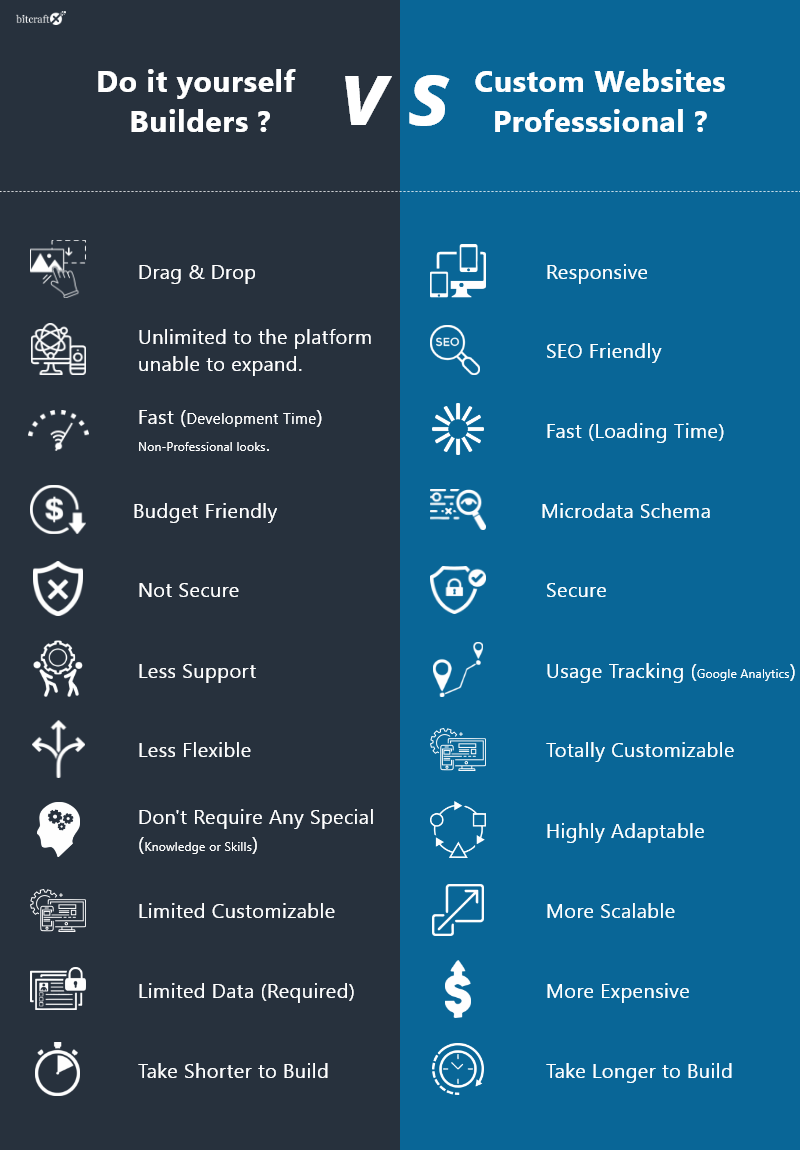
We can all argue that the builder route is for startups and businesses whose focus is not online. They just want their web presence. It can be pretty limiting with the builders as they can only offer you so much flexibility. Need to do anything out of the box, or fancy, then you are on your own, as with builders, you have to leverage only what they offer.
Why do you need a website?
Covid-19 has changed the way we conduct our business. With lockdowns and uncertain economic situations, it is important that we adopt new ways to conduct our business. Thankfully, with the growth of the internet and the wide adoption of technology, the customers are just a click away to discover your business or contact you online. Millions of customers are now shifting to online marketplaces where they are presented with a diverse set of products and services to buy while sitting in the comfort of their homes. From booking online appointments to purchasing groceries and conducting online classes, every business and profession has adopted the technology for their survival. Bitcraftx helps you in digitalizing your business, to create an online marketplace, consultation booking service, and to create doorways to the online world. We help your business get the exposure you need, without you having to move a step out of your office.Let’s Schedule a consultation session and discuss how we can help your business. We strive to provide the most economical web development service for you by minimizing the development cost. We have an offshore department in Asia, which helps us cut the cost, and in return, you get the best service possible. Our 6 Step Process Schedule a Free Skype/WhatsApp Call Discuss the Requirements Prepare a Cost Estimate Agree on Terms and Conditions Design and Develop Make your Site Live! Services we offer We provide 360-degree web services which include web design, web development, live websites, web maintenance, speed optimization, custom theme development, custom plugins, SEO, business process automation, eCommerce websites, and much more. We have certified developers onboard who help companies perform faster, smoother, and boost traffic and conversion rate with a result-driven solution. No matter the business size, no matter the project, we are the web smiths of the digital age! Our area of expertise lies in UI/UX providing truly engaging user experience services Custom integration to scale your website and integrate with various platforms and services Code review, profiling, and security for better performance and optimization, and configuration improvements Domain-based solutions for enterprise-level, small & medium businesses Developed to scale and user-friendly websites SEO optimized and multisite management Optimization of themes, plugins, and server performance CMS integration with existing websites CMS consultation, maintenance, and support 360-degree flexible solution specific to business needs Let’s get in touch and discuss your project at hello@bitcraftx.com.